Know When a Proposal Is Read
Proposal tracking is knowing, after you press send, whether the client opened the proposal, how far they got and where they stopped. Without it, you follow up on a hunch: too soon, or after the client has gone quiet for a week.
A tracked link answers the question for you. The tools below differ in what they track, what that costs, and whether you have to build your proposal inside their editor or can send the one you already made.
Loop
Loop is a Mac app that turns a file into your own branded link, and follows every open. You send the proposal you already made, as a PDF. When the client opens it, you see who opened it, how far they read and the time on each page, and a notification appears on your Mac the first time a reader opens it. The client can also draw on the page, leave a note, press Looks Good or ask a question, with no account. The recording below shows the client's side.
A real recording of Loop's reader page. Press play, or jump to a step.
The same steps in words:
- Open. The client opens your link on a page with your logo, name and colours.
- Read. They move through the pages. Loop counts the time on each page, and stops counting while the tab is hidden.
- Mark the fee. They pick the arrow and point at a line in the investment table.
- Add a note. They type a short note beside the total, here "Can we phase this?".
- Ask a question. At the end they press Ask Question, type it and add an email for the reply.
- Sent. They see that the question is on its way. You see it in Loop, with a Reply button.
This is the view you get on your side.
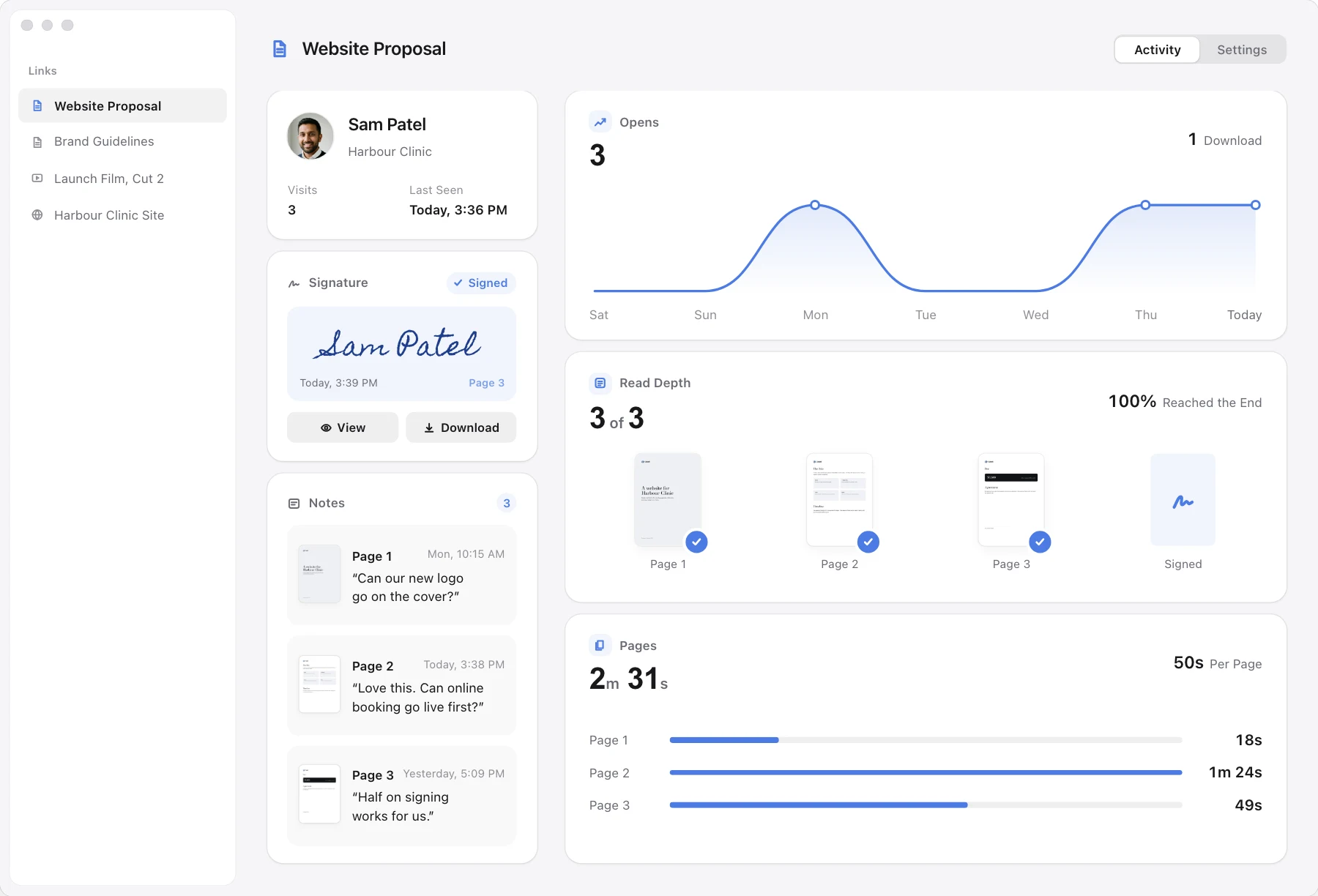
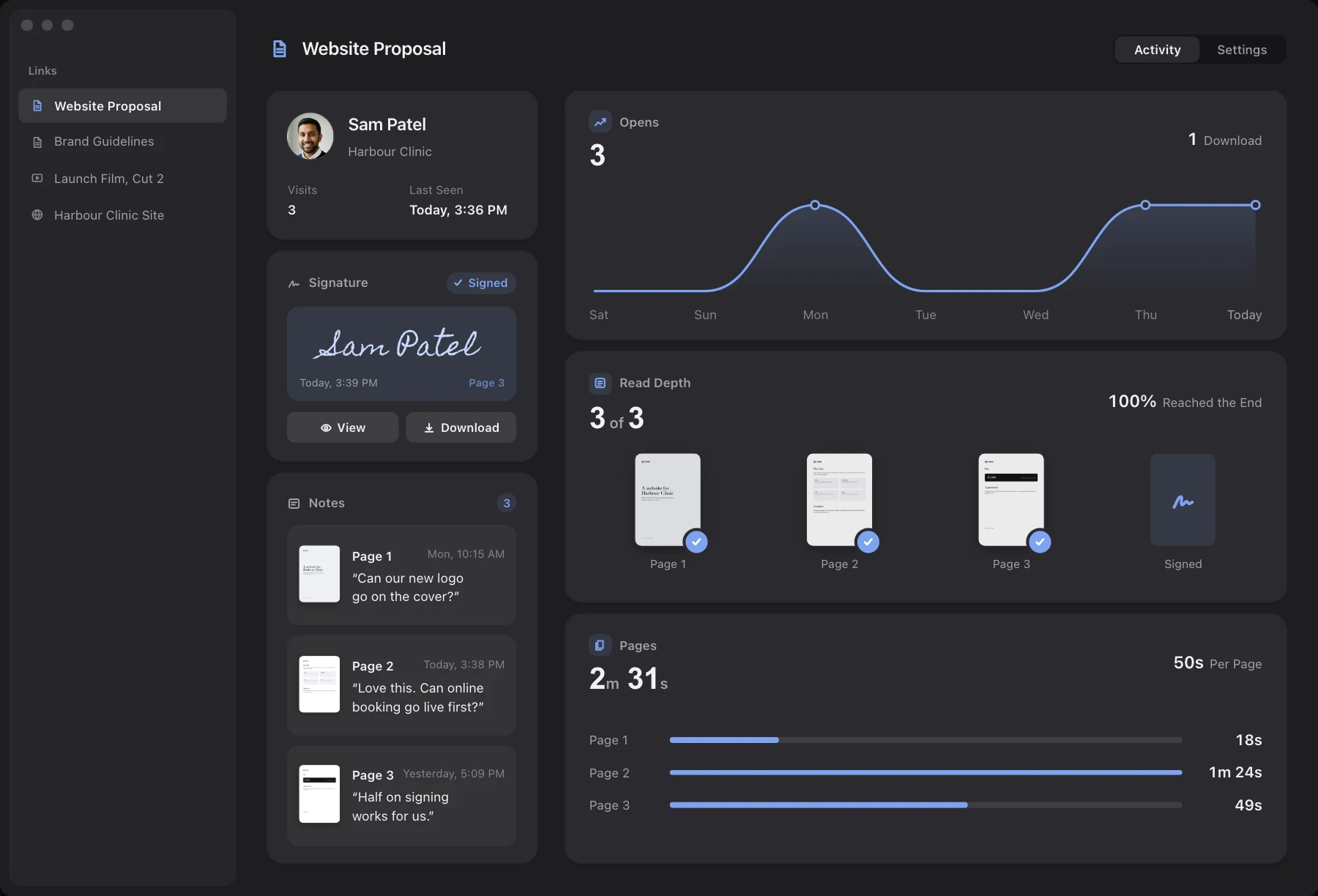
Each person who opens the link gets a row: their name or email, town, device, the furthest page they reached ("3 of 8"), when they were last seen and how many visits. The time on each page is an average across everyone who opened the link, so send one link per client and that average is theirs.
Highlights
- Your own branded link. Your logo, colours and typeface on every page your client opens.
- A notification on first open. Loop tells you the first time a reader opens it, on your Mac while Loop is running.
- How far they read. A read depth for each person, and an average time for each page.
- Questions and notes. The client leaves them on the page, and you reply from your own email.
- No account for your client. They open the link in any browser.
- Pay once. $49 for one person, yours forever, with a 14-day free trial.
Your own branded link, with notes on the exact second. $49 once.
Options
The tools below differ in what they track, what they cost and whether the client can respond on the page. Most of them are proposal builders, so you write the proposal inside the tool.
| Tool | Tracking | Cost, one person |
|---|---|---|
| Loop | Opens, how far, time | $49 once |
| PandaDoc | Page time on Business plan | $588 a year |
| Qwilr | Page time; names cost more | $420 a year |
| Proposify | Opens and time per section | $420 a year |
| DocSend | Opens and time per page | $360 a year |
| Papermark | Time per page, free plan | Free, or $348 a year |
US dollars for one person, billed yearly, before tax, on the plan that has the tracking and, where the vendor sells it, your own branding. Papermark's free plan has the tracking but not your own branding. Vendors show local currency to some visitors, so their dollar figures come from archived US copies of their pages, dated in the Sources question below. Papermark was read live with dollars selected. DocSend's page was read live on 23 October, with Standard at $30 a month. An archived copy of 17 August shows Standard at $45 and a $10 Personal plan, so check it before you buy.
PandaDoc
PandaDoc is a proposal and document platform. Its pricing page lists real-time tracking and notifications on every plan, including a free plan of 5 documents a month. Time per page is part of recipient analytics on Business and above, at $49 a seat a month, $588 a year, and Business is sold through a demo request. Starter is $19 a month, $228 a year, without per-page time.
Qwilr
Qwilr builds proposals as web pages. Its pricing page lists page analytics and notifications on Starter at $35 a user a month, $420 a year. Seeing who is viewing is on Growth only, at $275 a month for 5 users, $3,300 a year. There is no free plan, only a 14-day trial.
Proposify
Proposify is a proposal builder for agencies and teams. Its pricing page describes document analytics as a timeline of when each recipient opens the document and how much time they spend in each section. Build is $420 a user a year. There is a 14-day trial and no free plan.
DocSend
DocSend is built for sending documents you already made, with tracking per person and per page. Its how it works page says it shows views and time spent on each page by individual. We use Standard at $30 a user a month, $360 a year. DocSend's page was read live on 23 October with Standard at $30 a month, while an archived copy of 17 August shows $45 and a $10 Personal plan, so check it before you buy. Our Loop vs DocSend page goes further.
Papermark
Papermark is open-source document sharing with page-by-page analytics on every plan, including a free plan with 1 member and 50 links. Pro is $29 a month billed yearly, $348 a year. Its pricing page shows euros to a UK visitor, so we pressed the dollar button. Our Loop vs Papermark page goes further.
Limits
Loop is built for sending a proposal you already made and seeing how the client reads it. It is not a proposal builder or a sales system, and these gaps matter for some sales teams:
- No proposal editor, pricing tables or payments. Loop shares a file you made elsewhere.
- No CRM connection. There is no Salesforce, HubSpot or Zapier link. An AI app can read your activity through Loop's MCP server.
- Time on a page is an average. Send one link per client to read it as theirs. The Activity list shows each person's furthest page and visits, not their seconds.
- Notifications are on your Mac only, and Loop must be running. There is no email, phone or Slack alert.
- A typed email is not checked. If you ask for an email before viewing, Loop checks only that it looks like one.
- A company mail scanner may count as an open. Chat-app link previews and your own browser, with Exclude Me on, do not. We have not tested mail scanners.
- A simple electronic signature. The client types a name. It is not a certified signature.
- Mac only on your side. Clients open the link on any device.
If your team builds proposals in a tool with pricing tables and approvals, use PandaDoc, Qwilr or Proposify. If you send your own PDF and want to know when it is read, use Loop.
Cost
For one person for one year, Loop is $49, paid once. PandaDoc on a plan with per-page time is $588, Qwilr $420, Proposify $420 and DocSend $360. Papermark is free, or $348 a year for Pro.
Qwilr's $420 does not show who viewed a page. That needs Growth, at $3,300 a year for 5 users. PandaDoc Starter at $228 a year has no per-page time. The yearly prices come back every year, while Loop has no renewal.
Loop includes a 14-day free trial that starts on first run, and Loop asks for no payment to begin it. During the trial a small "Shared with Loop" badge shows on the pages your clients see, and it goes with a licence. Your files are stored in your own Cloudflare account, and Cloudflare may ask for a card when you switch storage on.
Sending a Tracked Proposal
Five habits make any tracked proposal more useful, whichever tool you use.
- Send a PDF. Export from Pages, Word or Google Docs so every client sees the same pages.
- Send one link per client. The page times then belong to that client.
- Put the price and the next step on the last page. Then the page where the client stops tells you something.
- Turn on Ask for Email when you need to know who opened it. Without it, a forwarded link shows as "No email given".
- End with a question. Loop's closing question, "What do you think?", lets the client press Looks Good or ask you something.