
About
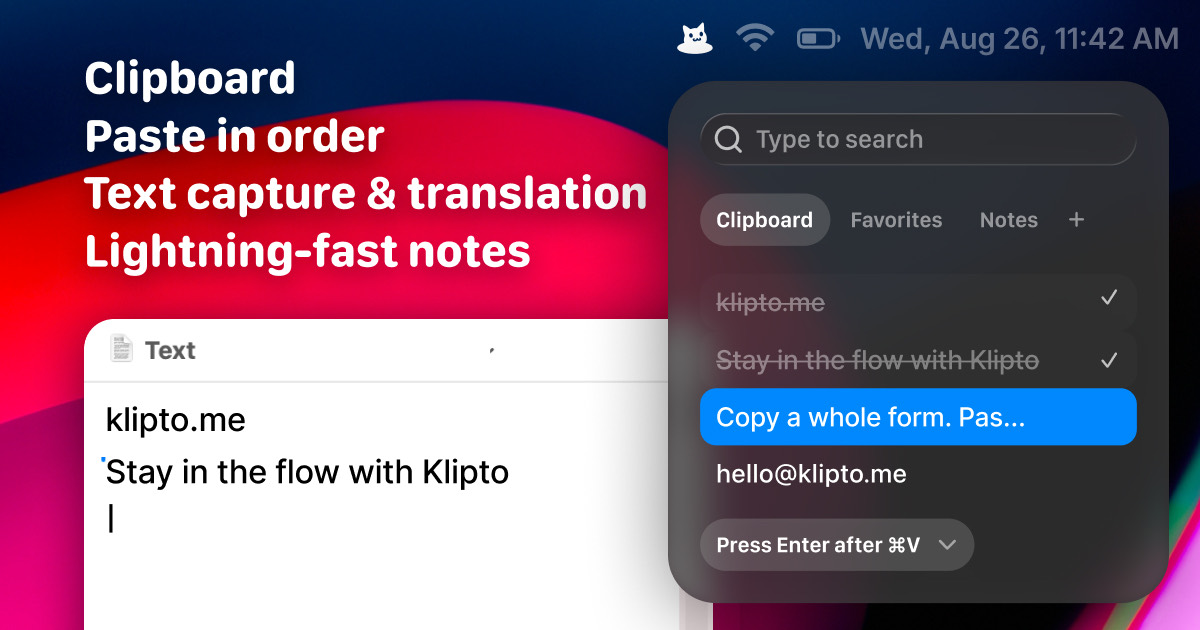
Klipto is a fast, private clipboard manager for macOS whose headline feature is the Stack. Fill it once, then just tap ⌘V: each press pastes the next item and jumps to the next field, with Tab, Enter or a comma added after every paste. Split Copy breaks a block of text into separate Stack items, and Collect gathers text, links and screenshots so you can unload them later, straight into Figma if you like. Hold ⌥⌘V to see your history, tap V to move through it, and release to paste.
Before you paste, the preview offers the right transform for what you copied: HEX to RGB, rich text to plain, JSON prettified, text case changed, or an Anti-LLM cleanup that strips em dashes, curly quotes and hidden characters. ⇧⌘2 takes text off anything on screen, and built-in OCR makes your copied images searchable. History lives in a local database on your Mac, with no account and no cloud sync. It needs macOS 14 or later, the free version keeps your last 100 copies, and Klipto Pro is a $19.99 one-time payment with a 30-day money-back guarantee.
Alternatives
- Maccy
Pick Maccy if you want a plain, keyboard-first history with nothing extra: it is open source under the MIT licence, free from maccy.app, and also needs macOS 14 or later.
- Paste
Pick Paste if you want your clipboard on iPhone and iPad too: one plan covers Mac, iPhone and iPad, at $29.99 a year or $99.99 once for a lifetime licence.
At a Glance
- Requires
- macOS 14 Sonoma or later, on Apple silicon or Intel
- Price
- Free, keeping your last 100 copies; Klipto Pro is $19.99, one-time, with a 14-day Pro trial
- Get It From
- klipto.me
Curator's Note
“A clipboard manager built around filling forms: copy everything once, then every ⌘V pastes the next item and tabs you onward.”
Theo, Mac Dept.