An app can fill the MacBook notch with music, a calendar, files and more. There are free and paid choices, and the best pick depends on whether you want a full toolkit or just your music. The list includes Echo, which we make, and we say where Echo does less. Every price below is what the vendor's own page showed on 26 October 2026, with the billing basis named. We read each app's own pages rather than roundups, and where a page does not say something we write 'Not listed'.
What Does a Notch App Do?
The notch is the cut-out at the top of the screen on newer MacBooks. Apple's support page calls it a camera housing and says it is on the MacBook Air with Liquid Retina display and the MacBook Pro with Liquid Retina XDR display. Apple's MacBook Pro and MacBook Air model pages show those displays on the 14-inch and 16-inch MacBook Pro from 2021 onward and the MacBook Air from the 2022 M2 model onward (13-inch and 15-inch). We found no Apple page that says whether the newer MacBook Neo has one.
A notch app draws a panel around that cut-out. It stays small until you hover, then opens to show things like the song playing, your next meeting, a file shelf or battery status. We found no Apple page that says macOS has a built-in Dynamic Island, so these apps add their own. Many also work on Macs without a notch by drawing a pill under the menu bar, which the table below covers. For the Dynamic Island angle, see our guide to a Dynamic Island for Mac.
Quick Picks
Best free toolkit: Boring Notch, free and open source under GPL-3.0.
Paid, built around the notch: Alcove, $13.99 one-time, with Live Activities, customizable HUDs and regular updates.
Most features, music included: Notchy, $24.99 one-time list price. Its own site counts 74 features.
Music only, in the notch: Echo and Tuneful.
Pay what you want: DynamicLake, one time, with a minimum.
Mac App Store route: NotchNest, free with optional in-app purchases.
Which Notch Apps Are Worth Trying?
Eight apps, in the order we cover them. The list includes Echo, which we make, so we say plainly where it does less than the others.
Boring Notch
Boring Notch turns the notch into a music control center with a visualizer, and adds a calendar, reminders, a file shelf with AirDrop, a camera mirror, a charging indicator and a replacement for the system volume and brightness pop-ups. It is free and open source under GPL-3.0, and needs macOS 14 Sonoma or later. Its README does not list players, but its release notes name Spotify and Apple Music controllers and YouTube Music through the Pear Desktop app. The README also says the team has no Apple Developer account yet, so macOS shows an unidentified developer warning the first time you open it by hand; the README says a Homebrew install avoids it. For a head-to-head, see Boring Notch vs Alcove vs NotchNook.
Best for: a free toolkit in the notch, if you are happy to approve the first launch yourself.
Not for: macOS 13 or earlier, or anyone who wants an app that opens with no security warning.
Alcove
Alcove is $13.99 one-time, with all future updates included, a limited 72-hour trial and use on up to 3 devices at once. Its site and changelog list Live Activities, instant notifications, customizable HUDs, Lock Screen widgets, a calendar that reads third-party calendars, weather and, since version 1.7, a pill shape for notchless displays. For music it lists a system-wide media player, playback controls for podcasts and live streams, a live waveform, and deeper Spotify, AutoMix and AirPlay support. It needs macOS 15 or later. Its FAQ notes that Alcove relies on private Apple APIs, and says no personal data is collected.
Best for: an all-round paid notch app that you buy once.
Not for: macOS 14 or earlier, or anyone who wants a free app.
Notchy
Notchy lists $24.99 one-time for one Mac, with a 7-day trial and updates included. On 26 October its site showed a Black Friday banner at GBP 14.99 until 30 November, so check the price when you read this. It is closed source and needs macOS 13 Ventura or later. The feature list includes clipboard history, a file shelf with AirDrop, timers, a calendar, HUDs, a system monitor, window snapping and a command palette. For music it shows album art, a scrubbable timeline and play and pause controls for Apple Music and Spotify, and reads system media so most other macOS players work too. On Macs without a notch it floats the same island as a pill.
Best for: the longest feature list in one app, with music included.
Not for: anyone who wants open source code, or one licence for several Macs.
DynamicLake
DynamicLake is pay what you want with a minimum, a one-time payment with no subscription, lifetime updates and use on up to 3 devices. The minimum showed as GBP 10.48 in the UK view of its Gumroad page. There is no free trial of the full app, only DynamicLake Playground, a free app for testing plugins that has basic music support. It needs macOS 14 or later. Its music page says it supports all music apps, naming Apple Music, Spotify and YouTube, with like, shuffle and repeat, and its changelog lists a queue for Apple Music and Spotify. Its FAQ narrows 'all' to the music apps the macOS music widget supports. It also has file drop, schedule and weather, notifications and timers, and it works on notch and non-notch MacBooks.
Best for: people who like to choose the price, and want files and music in one place.
Not for: anyone who wants to try the full app before paying.
Atoll
Atoll is free and open source under GPL-3.0, with no price shown anywhere. Its README lists Live Activities for focus, screen recording, privacy indicators and battery, Lock Screen widgets, system stats for CPU, GPU, memory, network and disk, timers, clipboard history, a colour picker, calendar previews, a shelf and a terminal tab. Media controls cover Apple Music, Spotify, Cider and more. It needs macOS 14 or later, and the README credits Boring Notch's code as the base of its media player. The requirements list a MacBook with a notch.
Best for: a free, open-source toolkit with system stats, on a MacBook that has a notch.
Not for: Macs without a notch.
NotchNest
NotchNest is sold through the Mac App Store. It is free with in-app purchases, and its site says Premium removes the free-tier limits for $2.99 a month or $14.99 once. Free limits include five clipboard items and a three-second camera mirror. It needs macOS 14 or later. Its App Store text lists music controls for Spotify, Apple Music and YouTube Music, while its own site names Spotify and Apple Music with album art. Extras include clipboard history, a file tray with AirDrop, a calendar, quick notes and a Pomodoro timer. Without a notch it shows as a slim drop-down panel at the top centre.
Best for: starting free through the Mac App Store, then paying once if you want more.
Not for: anyone who dislikes free-tier limits.
Tuneful
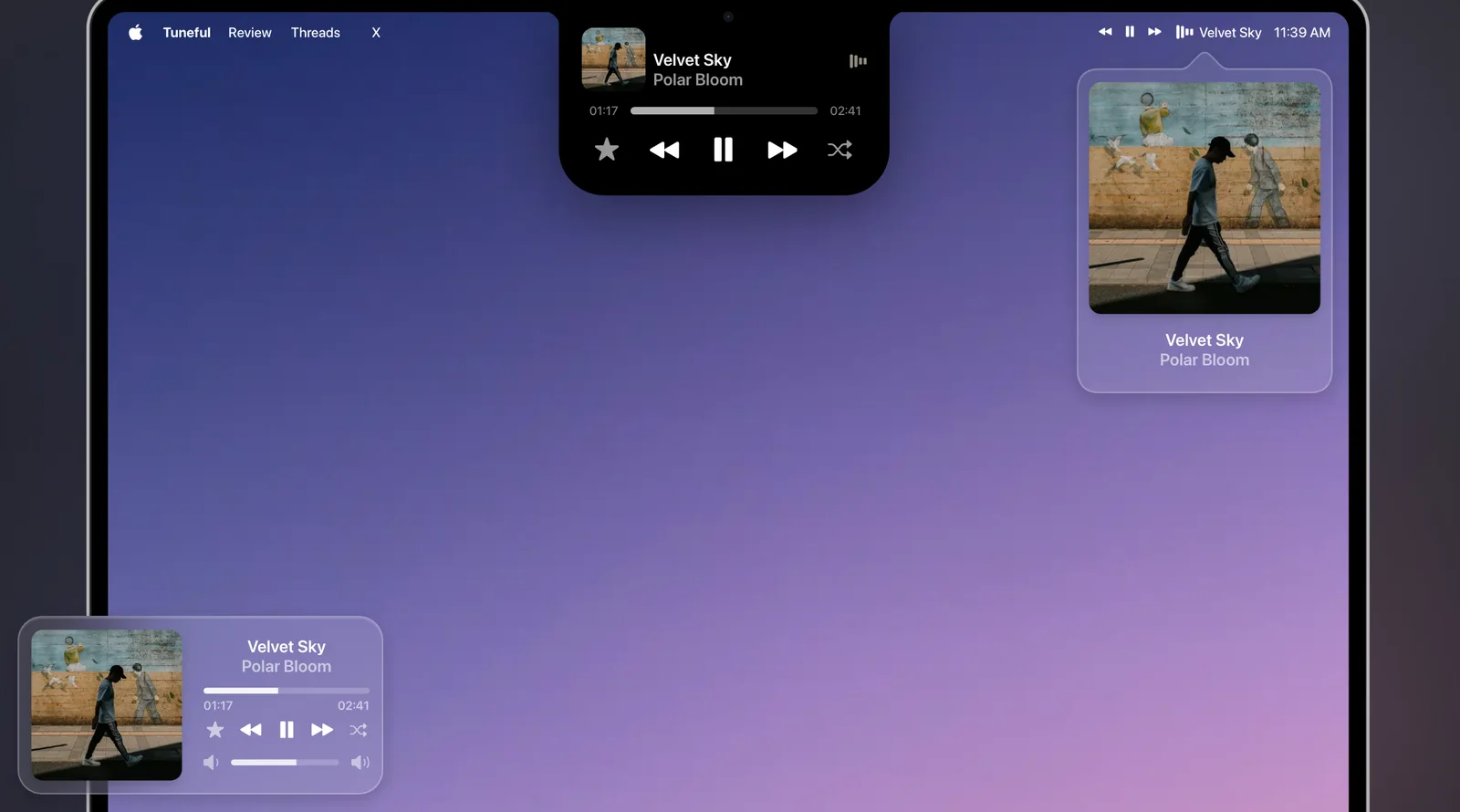
Tuneful is $4.99 one-time on the Mac App Store in the US (£3.99 in the UK), and its FAQ says new releases are free updates. It offers a notch player, a menu bar player and a floating mini player, and each one is optional. It works with Spotify and Apple Music, adds Last.fm scrobbling, and its notch player auto-hides on any display, notch or not. It needs macOS 15 or later. We compare it with Echo in Echo vs Tuneful.
Best for: a simple music player in the notch, bought from the Mac App Store.
Not for: files, calendars or other tools in the notch, or macOS 14 or earlier.
Echo
Echo is the narrowest app on this list. Its notch is a now-playing island only: it grows into a black island with the artwork and Echo's three animated bars, drops down with the title on each new song, and expands on hover with controls. Macs without a notch get a small black pill under the menu bar. There is no file tray, calendar or clipboard, so every toolkit above does more in the notch.
Echo's reason to be here is the music. The notch shows music, podcasts and YouTube video from your music apps and your browser, and the same song can also appear next to the clock in the menu bar and across your desktop. Echo also keeps a private, searchable history of everything you play and resumes any of it at the exact spot with a keystroke. Notchy lists a smaller local listening history of your 500 most recent recordings, off by default. The notch, menu bar and desktop displays are free with Echo and stay off until you switch them on in Settings > Now Playing. Echo is $4.99 once for three Macs, and needs macOS 13 or later. For the Spotify side, see Spotify widget for Mac.
Best for: seeing what is playing in the notch, plus a history that resumes where you stopped.
Not for: a file tray, calendar or HUDs in the notch.
 Every song, podcast and video, right where you left off
Everything you play, back at the exact spot.
Get Echo
Every song, podcast and video, right where you left off
Everything you play, back at the exact spot.
Get Echo
What Do They Look Like?
Echo's Now Playing, playing itself, with its notch island at the centre. Below it, Tuneful's notch player, menu bar popover and mini player.