On 26 October 2026 NotchNook's product page no longer loads, so the real choice today is between Boring Notch (free, open source) and Alcove ($13.99 once). We compare all three row by row, and say where Echo fits if all you want is music in the notch. We used only what each maker's own pages, README and release notes say. Echo is our app, so we also say where it does less than the others.
What Is Each App?
NotchNook: A Notch App With a Missing Page
NotchNook is a Mac notch app from lo.cafe. An archived copy of its page from 20 July 2026 described widgets, live actions and a files shelf, and said it turns into a handler with the same functions on Macs without a notch. That archived page asked for macOS 14.6 or later. Whether it is still on sale is covered in the next section.
Best for: readers who already own it and want to compare it with the others.
Not for: anyone who needs to buy a copy today, because we could not confirm it is on sale.
Boring Notch: Free and Open Source
Boring Notch turns the notch into a music control center with a visualizer. It also adds a calendar, reminders, a file shelf with AirDrop, a camera mirror, a charging indicator and a system HUD replacement. It is free under the GPL-3.0 licence, and its code is public on GitHub, where it had 11,143 stars on 26 October 2026.
Best for: people who want a free notch app with many tools and don't mind a macOS warning on first launch.
Not for: anyone on macOS 13 or earlier, or anyone who wants an app macOS opens without a warning.
Alcove: A Paid Notch App With Live Activities
Alcove adds Live Activities, instant notifications, customizable HUDs, Lock Screen widgets, a calendar that reads third-party calendars, weather and swipe gestures. For music, its changelog lists playback controls, podcasts, live streams, playback speed and a live waveform. It costs $13.99 once.
Best for: people who want a paid notch app with many features, a trial and a refund window.
Not for: anyone on macOS 14 or earlier, or anyone who wants to read the source code, because its pages do not say it is open source.
Is NotchNook Still Available?
On 26 October 2026 NotchNook's product page returns a not-found message, and the maker's home page (lo.cafe) carries a long statement about the company's situation, saying NotchNook has not ended and that access will be restored, and points to a successor called NOOTCH, which was a closed beta. The price on its archived product page, in an archived copy from 20 July 2026 and in later copies, was $3 a month or $25 once, in US dollars. We could not confirm that you can buy NotchNook today, so we have not ranked it.
The successor's own page, NOOTCH on lo.fi, says its beta key worked until 21 October. If you are shopping for a notch app this week, the practical choice is between the two apps below. For a wider list of notch apps, see our roundup of the best notch apps for Mac.
 Every song, podcast and video, right where you left off
Everything you play, back at the exact spot.
Get Echo
Every song, podcast and video, right where you left off
Everything you play, back at the exact spot.
Get Echo
Boring Notch vs Alcove: Which Should You Install?
Here are the same seven questions for each app. Where a page does not say, we write that it does not.
Price and licence. Boring Notch is free, with a donation link, under GPL-3.0. Alcove is $13.99 one-time, all future updates are included, and its FAQ gives a 72-hour trial, a refund within 14 days and use on up to 3 devices. NotchNook was last listed at $3 a month or $25 once.
Music. Boring Notch's README promises a music control center with a visualizer, and its release notes name Spotify and Apple Music controllers and YouTube Music through the Pear Desktop app. The README lists no players. Alcove's changelog lists playback controls, podcasts, live streams and, in version 1.7, deeper Spotify support. We found no complete player list on its pages. NotchNook's last page does not say.
Other features. Boring Notch adds a calendar, reminders, a file shelf with AirDrop, a camera mirror and HUD replacements. Alcove adds Live Activities, notifications, HUDs, Lock Screen widgets, calendar and weather. NotchNook listed widgets, live actions and a files shelf.
Macs without a notch. Alcove's changelog lists a pill shape for notchless displays. Boring Notch's README does not say, but its release notes mention options for non-notch displays. NotchNook's archived page says it becomes a handler with the same functions.
macOS needed. Boring Notch needs macOS 14 Sonoma or later, Alcove needs macOS 15 or later, and NotchNook's archived page asked for macOS 14.6.
How you install it. Alcove is sold from its own site. Boring Notch is a free download, and its website currently offers a release candidate, v2.8-rc.2, while GitHub's latest stable release is v2.7.3 from November 2025. Its README says the team has no Apple Developer account yet, so you either bypass macOS's quarantine check by hand or install through Homebrew, which the README says bypasses the warning.
What the maker says about risks. Boring Notch's README says the team has no Apple Developer account yet, so macOS warns about an unidentified developer when you open it. Alcove's FAQ says it relies on private APIs, which Apple does not document, and also says it collects no data or personal information. We found no risk note for NotchNook.
Side by Side
| App | Price | macOS | Music | Other Features | Without a Notch | Install and Status |
|---|---|---|---|---|---|---|
| NotchNook | Last listed: $3 a month or $25 once | 14.6 (archived page) | Not stated on its last page | Widgets, live actions, files shelf | Becomes a handler (archived page) | Product page not found on 26 October 2026 |
| Boring Notch | Free, GPL-3.0 open source | 14 | Controls and visualizer; Spotify and Apple Music named in release notes | Calendar, file shelf, camera mirror, HUDs | Release notes mention non-notch displays | Free download, no Apple Developer account yet (README) |
| Alcove | $13.99 one-time, 72-hour trial | 15 | Controls, podcasts, live streams, waveform | Live Activities, HUDs, widgets, calendar, weather | Pill shape | Sold from its own site, relies on private APIs |
| Echo | $4.99 once, three Macs | 13 | Artwork, scrubber, controls for what Echo tracks | Now-playing island only, plus menu bar and desktop displays | Small pill | Direct download |
Apple calls it a camera housing, and its support page covers the Macs that have it. Apple says it is on the MacBook Air with Liquid Retina display and the MacBook Pro with Liquid Retina XDR display, which Apple's MacBook Pro and MacBook Air model pages show on the 14-inch and 16-inch MacBook Pro from 2021 onward and the MacBook Air from the 2022 M2 model onward, in 13-inch and 15-inch sizes. We found no Apple page that says whether the newer MacBook Neo has one. On any other Mac, a notch app needs a pill or a drop-down.
Where Does Echo Fit?
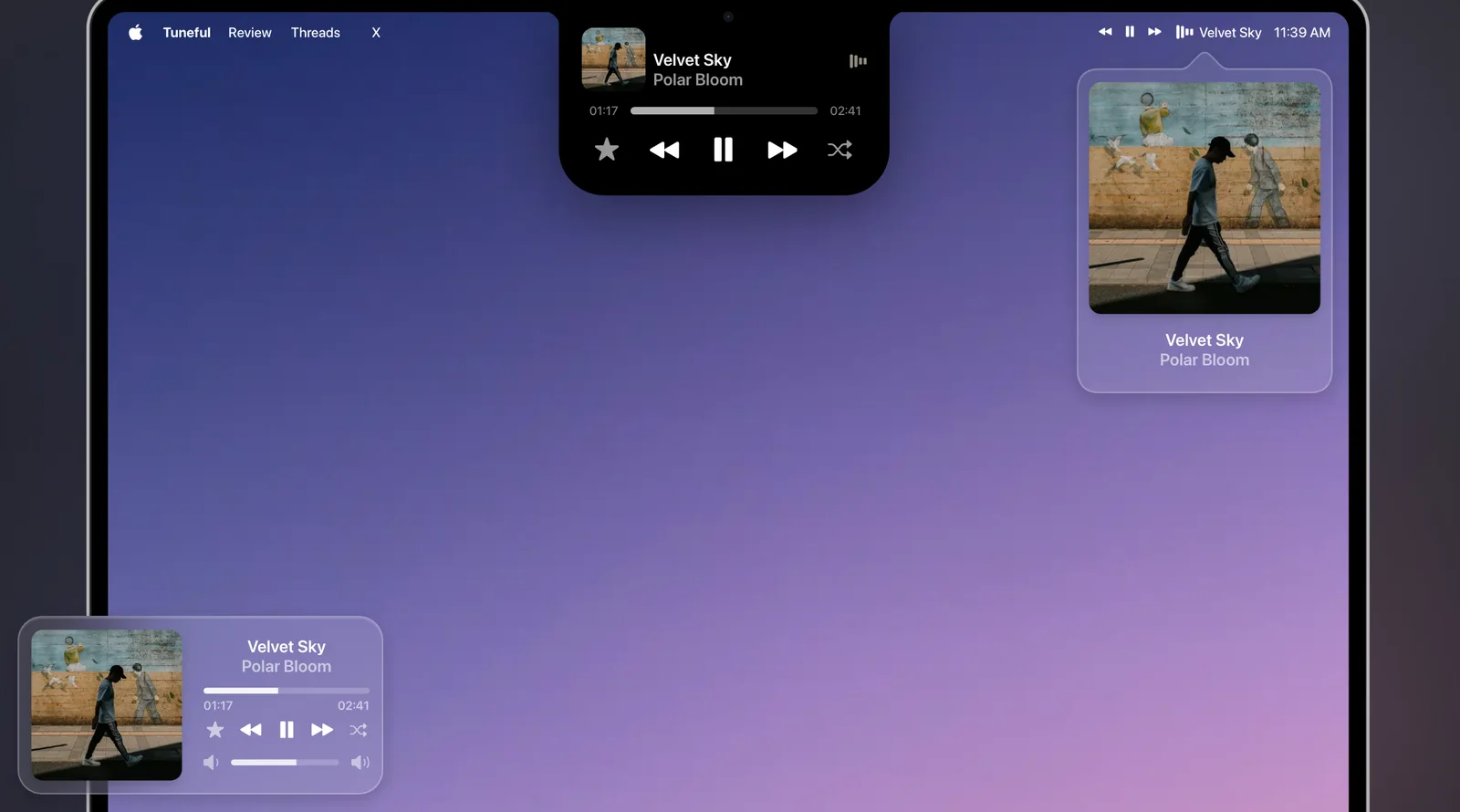
Echo is not a notch toolkit. Its notch is a now-playing island only: it has no file tray, calendar, clipboard or HUD replacement, so Boring Notch and Alcove do more there. When something plays, the notch grows into a black island with the artwork and Echo's three animated bars, drops down with the title on each new song, and opens with controls when you hover. Macs without a notch get a small black pill under the menu bar.
The notch is free with Echo and stays off until you switch it on in Settings > Now Playing. The same page has a menu bar display and a desktop display, in any mix. Echo is $4.99 once for three Macs, and needs macOS 13 or later.
What Echo adds is memory. It keeps a private, searchable history of what you play across music apps, podcasts and browser video, and resumes any of it at the exact spot with one keystroke. Notchy, another notch app, lists a local listening history of your 500 most recent recordings, off by default. Echo's history covers every source it tracks.
Best for: people who only want music in the notch, plus a history that resumes where they stopped.
Not for: anyone who wants a file tray, calendar or HUDs in the notch.
What Does Echo's Notch Look Like?
Echo's Now Playing, playing itself, with its notch island at the centre. Below it, the notch player from Tuneful, another music app.